





ANTIK Smart Key Safe
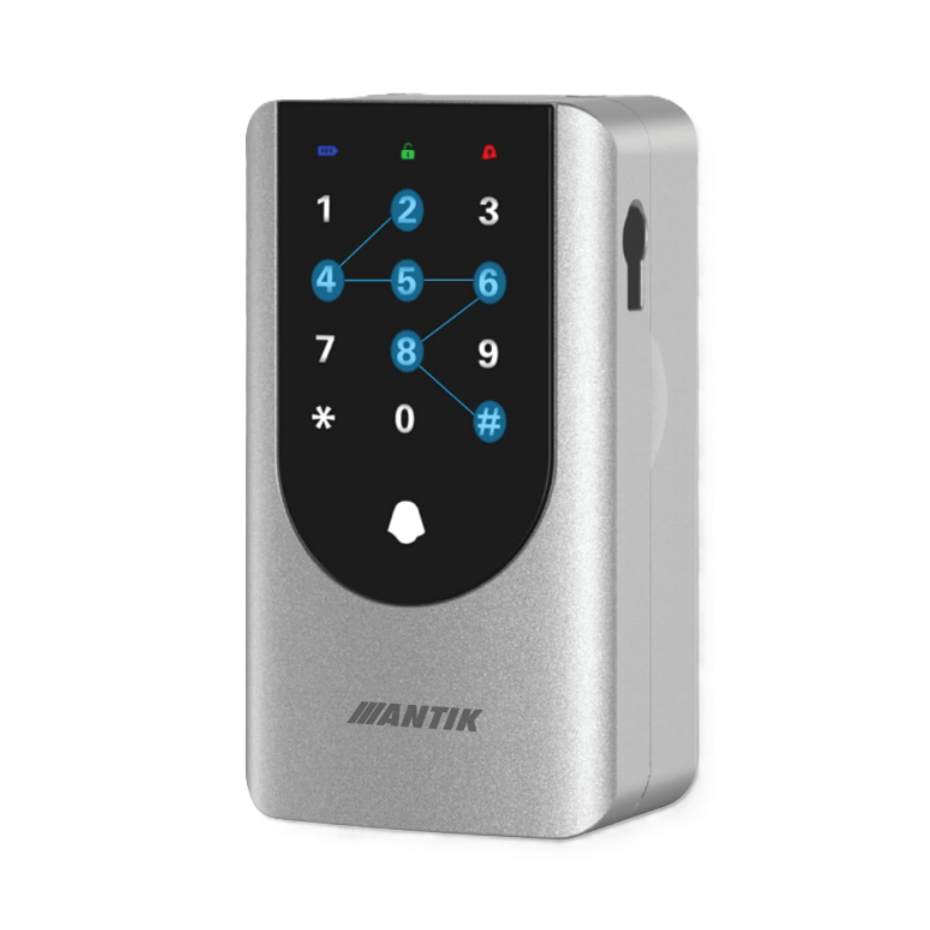
- Dimensions: 143 × 78 × 48 mm
- Power supply: 4× AAA batteries (DC 6V), not included
- Battery life: approx. 12 months with normal use
- Waterproof: IP66 (rain and dust resistant)
- Operating temperature: -20°C to +65°C
- Operating humidity: 10% - 90% RH
- Unlocking methods: PIN code / ANTIK SmartHome mobile application (BLE or gateway) / mechanical key
- PIN code: 6–8 digits, modes – custom, time-limited, one-time, dynamic, erasable
- Virtual password: protection against monitoring (possibility to add random numbers before/after the code)
- Temporary passwords: time-limited, one-time, dynamic, clear, and personalized
- Maximum number of passwords: up to 100 (including temporary ones)
- Remote control: via BLE gateway
- Additional features: built-in bell, low battery alarm, touch keypad with audible alarm
- Mounting: padlock or fixed wall mounting
- Reset: RESET button under the battery cover (3 seconds, beep)
ANTIK Smart Key Safe ATK-SHKLB2 is a robust, compact and weatherproof IP66 box designed for safe storage of keys indoors and outdoors. The body made of durable materials and the touch numeric keypad are designed for long-term operation in temperatures from -20 °C to +65 °C and humidity from 10–90% RH . Thanks to the dimensions of 143×78×48 mm and accessories, it can be mounted on a wall or used with a bracket on the door fitting, making it suitable for family homes, guesthouses, rentals and corporate buildings.
The device supports three unlocking methods – PIN code , ANTIK SmartHome application (BLE / remotely via gateway) and mechanical emergency key . For greater security and convenience, there is a virtual password against surveillance, temporary, one-time and dynamic codes and management of up to 100 codes for family, guests or service. There is also a built-in doorbell that will notify you of the arrival of a visitor.
Power is provided by 4× AAA (DC 6 V) with a typical battery life of up to 12 months , while the application warns of a low battery . In the app, you manage codes and set their validity - ideal for self-service check-in in rentals, sharing keys in the family or returning the vehicle to the rental office.
ANTIK Smart Key Safe ATK-SHKLB2: Instructions in .PDF can be downloaded HERE.


Advanced unlocking methods
The ATK-SHKLB2 key cabinet offers multiple access methods, making it highly flexible for various usage scenarios. Users can choose a classic PIN code, unlocking via the ANTIK SmartHome mobile application, or a mechanical key for emergency situations. There is also the option of generating temporary or one-time passwords, which increase the comfort of sharing. Virtual passwords provide advanced protection against eavesdropping when entering the code. This system will ensure access always and under all circumstances.
- PIN code 6–8 digits with different modes
- Unlocking via the ANTIK SmartHome application (BLE, via gateway and remotely)
- Emergency mechanical key
- Virtual password against surveillance
- Temporary, one-time, and dynamic passwords

Built-in bell and other practical features
In addition to unlocking, the device also offers added features that increase its practical value. An integrated doorbell allows visitors to easily notify you of their arrival. Support for the ANTIK SmartHome application ensures compatibility with other smart home devices, allowing you to create complex automation scenes.
- Integrated visitor bell
- Compatibility with the ANTIK SmartHome application
- Possibility of integration into smart scenes
- BLE and Wi-Fi support via gateway
- Expandability within the ANTIK SmartHome system

Durable construction and IP66 protection
The device is designed for long-term use both outdoors and indoors, meeting strict requirements for durability. IP66 protection protects against water and dust, which ensures reliable operation even in adverse weather conditions. The robust construction provides resistance to mechanical damage and wear, which increases the device's lifespan. This makes it suitable for use in family homes, apartments and corporate buildings.
- IP66 protection against water and dust
- Operating temperature –20°C to +65°C
- Durable keyboard with touch buttons
- Suitable for both outdoor and indoor use
- Long-term reliability in various conditions

Intelligent access management
The ANTIK SmartHome application provides convenient and clear management of all access methods. Users can easily generate new codes, set their validity and check access history. This allows for efficient management for family, guests or short-term rentals. Remote management via gateway opens up the possibility of control from anywhere in the world.
- Generating and managing PIN codes in the application
- Time restriction of access as needed
- Overview of history and access logs
- Quick pairing via Bluetooth
- Remote control via the Internet

Advanced security features
The device's security is supported by several intelligent features that prevent misuse. A virtual password reduces the risk of the code being observed, while an alarm warns of unauthorized opening attempts. The user is also informed of low battery status to prevent unexpected loss of functionality.
- Alarm when password is entered incorrectly or tampered with
- Low battery warning
- Virtual password function
- Reset via special correct PIN
- Protection against unauthorized access

Flexible mounting and power supply
The ATK-SHKLB2 cabinet is easy to install on a wall or other solid surface, requiring no complicated wiring. It is powered by four AAA batteries, which provide up to 12 months of operation on a single installation. This allows for easy maintenance and trouble-free operation even with intensive use.
- Mounting on a wall or other surface
- Powered by 4× AAA batteries (DC 6 V)
- Battery life up to 12 months
- Easy access to the reset button
- Easy installation without wiring
Scene: Self check-in for guests
Imagine that your guests arrive at your vacation home or Airbnb late at night. You don't have to wait for them in person or deal with handing over the keys. In the ANTIK SmartHome application, you simply create a temporary PIN code or assign access via IC card. Guests open the safe themselves, take out the stored keys and comfortably check in. Everything will be done safely, under your full control and without unnecessary stress.
For this scene you need:
– ANTIK Smart Key Safe ATK-SHKLB2
– ANTIK SmartHome application on mobile


For more details, watch the accompanying video
Step into the world of Smart technologies with us, where we will introduce smart products from the areas of home, security, comfort, health, camera systems and many other areas. Choose from a variety of smart devices that will reliably secure your home, business, garage or cottage.


Download the ANTIK SmartHome® app
With the ANTIK SmartHome® application, you have your ATK-SHKLB2 box under control - manage access, see status, set up automations, and enable remote unlocking via the gateway .
In the app you can:
- Manage PIN codes (6–8 digits) – temporary/one-time/dynamic, validity or repetition.
- See lock status and battery %, receive notifications (incorrect code, low battery, doorbell).
- Check event history (date/time, access method).
- Set Auto Lock (delay), Do Not Disturb, volume, language, and ringtone.
- Create automations/scenes.


Multi-column
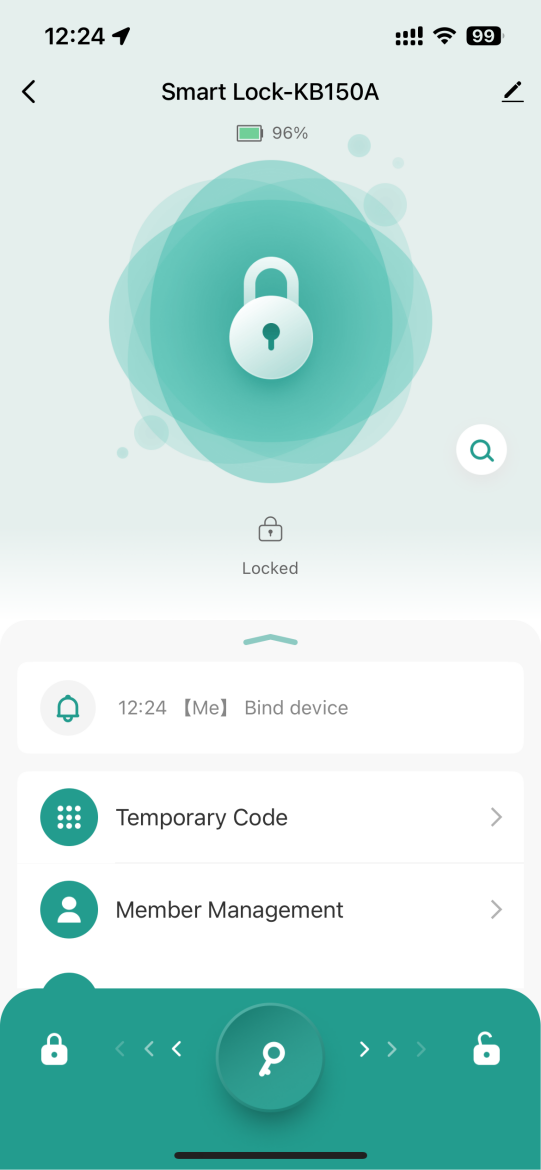
Lock status overview
The main screen instantly shows the device status and battery level. The user can see whether the box is locked or unlocked and has an overview of the remaining battery capacity. There are also auto-lock notifications for increased security.
- Display lock status (locked/unlocked)
- Battery indicator in % for power control
- Auto-lock and notification history
- Quick access to temporary codes
- Member Management Overview
This screen is important for quick orientation and control of the device, which you will especially appreciate when managing multiple users or rentals.
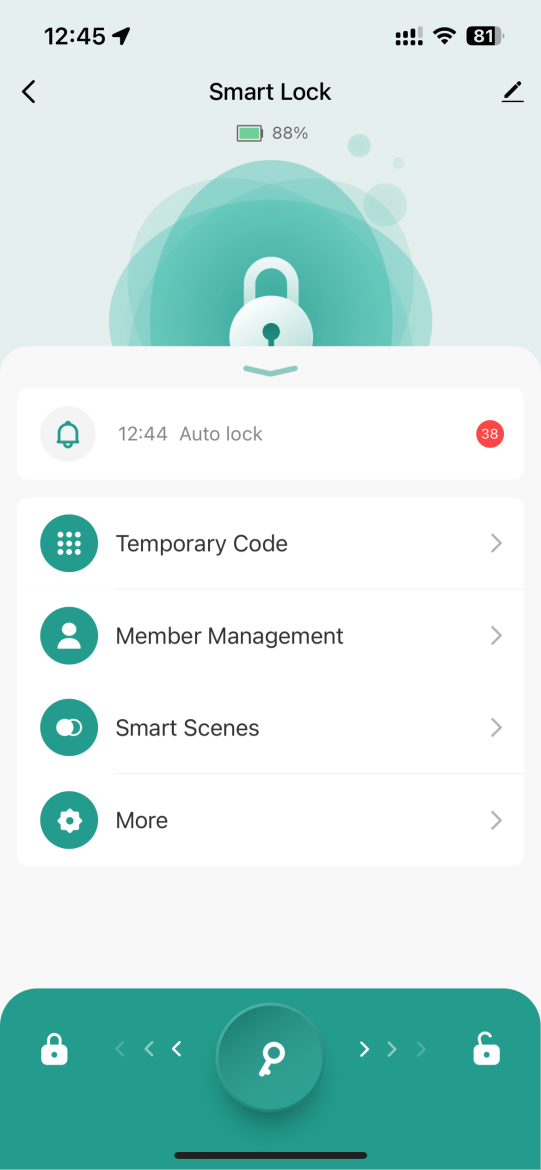
Quick access to functions
This screen offers a clear and intuitive menu for managing all key lock functions. The user has immediate access to setting temporary codes, managing members, creating automated scenes and detailed device settings.
- Temporary Code – easy creation and management of temporary access codes
- Member Management – overview of users and their permissions
- Smart Scenes – lock integration into smart scenes and automations
- More – advanced settings and additional features
This menu speeds up operation and allows for quick resolution of common tasks, which is especially crucial when managing multiple users or accommodation facilities.
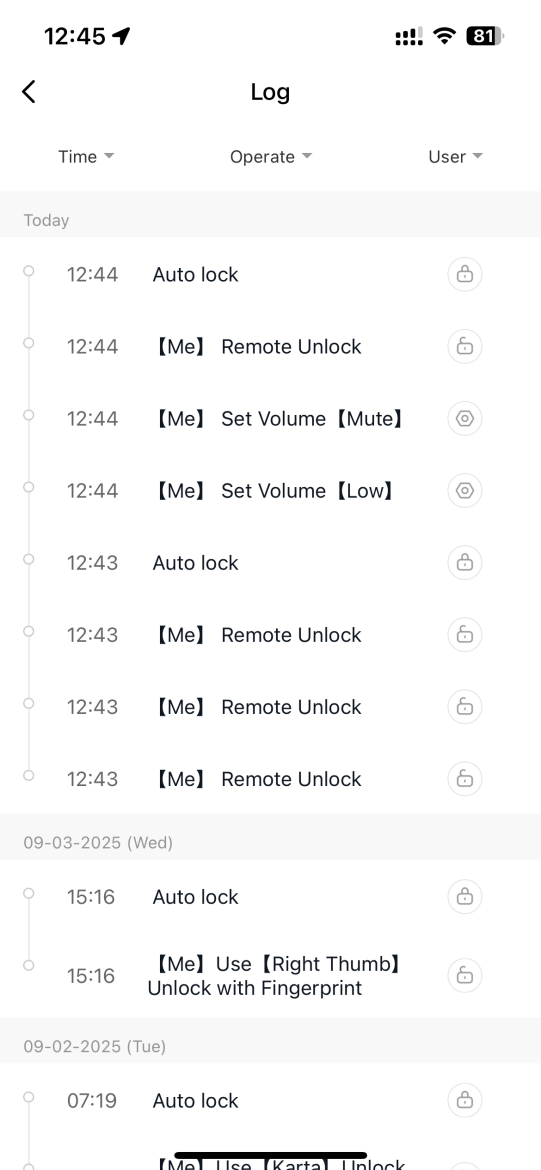
Record history
The Log screen provides a detailed overview of all lock activity. Each action is recorded with the exact date and time, allowing you to track when and how the lock was used, giving the user full control over the device's security history.
- View all events in chronological order
- Exact date and time of each event
- Information about the user who unlocked or locked
- Identification of access method (PIN, fingerprint, card, remote unlock)
- Possibility to track automatic actions (e.g. auto lock)
This feature is crucial for security as it allows for access control and detects unusual unlock attempts.
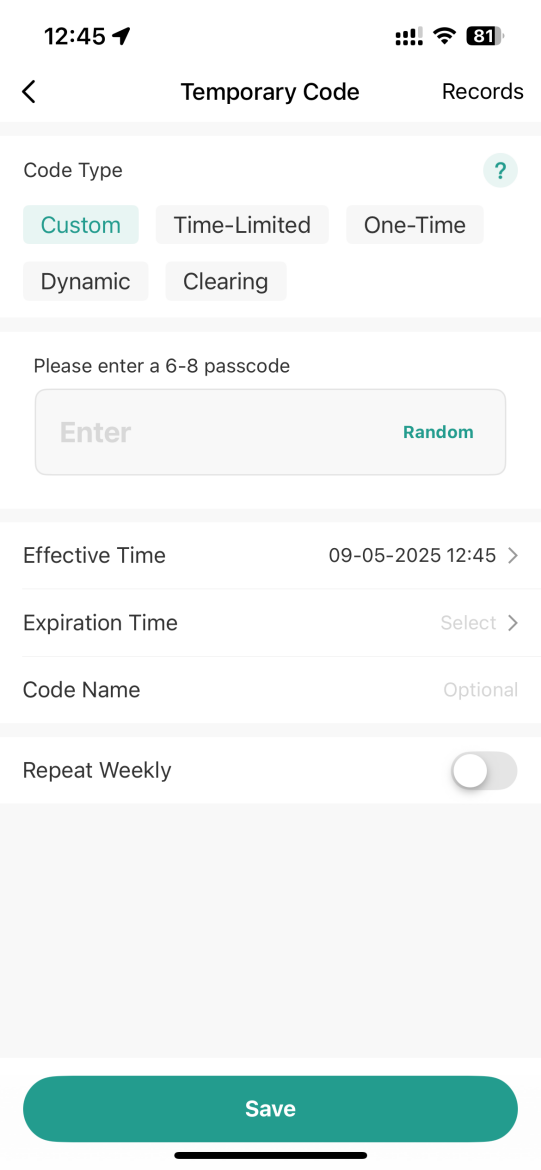
Creating a temporary code
The Temporary Code interface allows you to quickly set up access without having to share permanent codes. This makes it easy to give access to the lock to, for example, couriers, cleaning services or short-term guests.
- Code type selection: Custom, Time-Limited, One-Time, Dynamic, Clearing
- Enter a 6–8 digit code or generate a random one
- Defining the validity period from – to
- Option to name the code for easier identification
- Repeat Weekly feature for regular repetition
This feature is ideal for situations where you need to grant access securely and temporarily without the risk of compromising the master code.
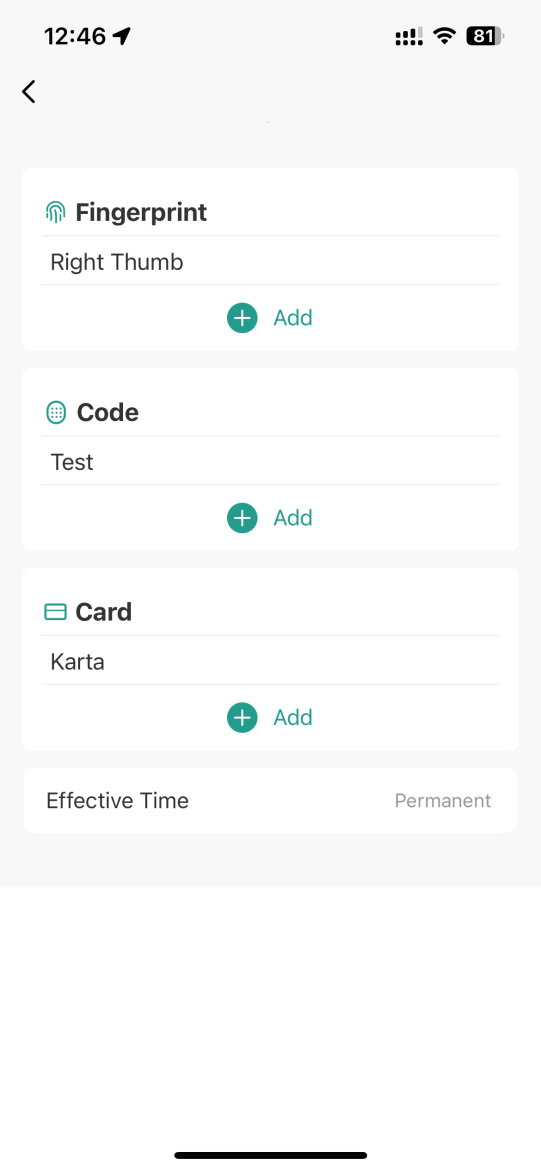
Adding an access method
The screen allows you to easily add a new unlocking method to the lock. The user can choose between fingerprint, access code or IC/MIFARE card. All methods are clearly displayed and their management is intuitive.
- Fingerprint – add a fingerprint (e.g. right thumb)
- Code – create and save an access code
- Card – registration of an access card or chip
- Possibility to combine multiple methods for one user
- Effective Time setting – permanent or time-limited access
This feature is important for flexibility and allows you to choose the most appropriate access method according to the needs of the user or guests.
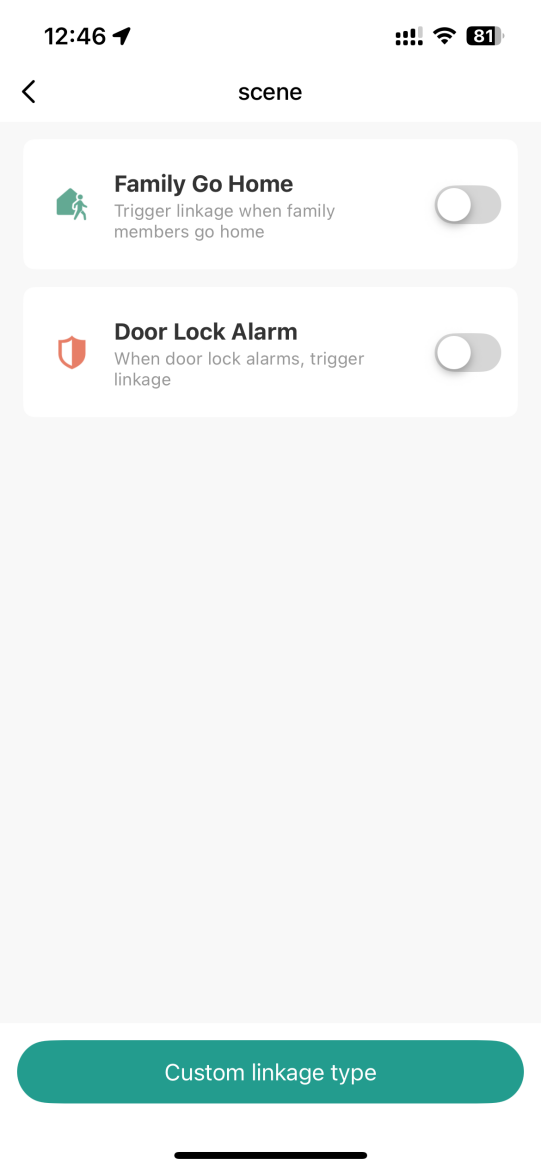
Setting notifications and scenes
The screen allows you to activate smart notifications and automations associated with the lock. Users can set alerts for family members returning or for door alarms to be activated.
- Family Go Home – receive a notification when family members return home
- Door Lock Alarm – immediate notification of an attempted break-in or door left open
- Easy switching on/off of individual scenes
- Ability to create your own automations via Custom linkage type
- Clear management of all scenes in one place
This feature is important for increasing safety and comfort, as it always informs you immediately about important events.
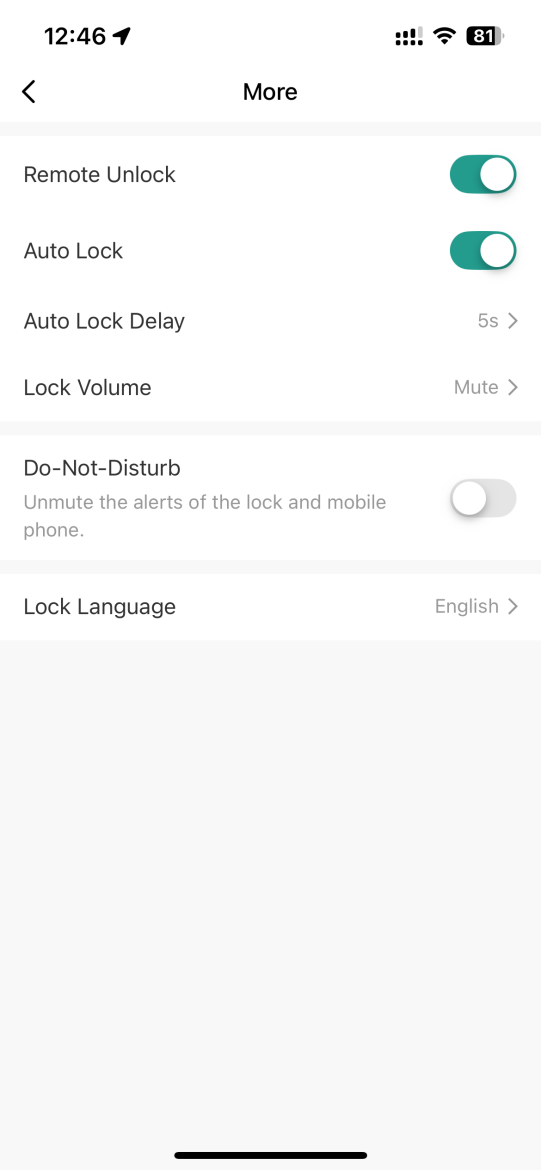
Advanced settings
A menu designed for detailed configuration and customization of the lock according to individual needs. Allows you to set automatic locking, remote unlocking, delay time, volume adjustment, and do not disturb mode.
- Remote Unlock – enable or disable remote unlocking
- Auto Lock & Delay – automatic locking with delay setting
- Lock Volume – adjust volume or mute completely
- Do-Not-Disturb – blocking notifications when you need privacy
- Lock Language – change the lock language mutation
This section is key for personalizing security preferences and comfortable use in different situations.
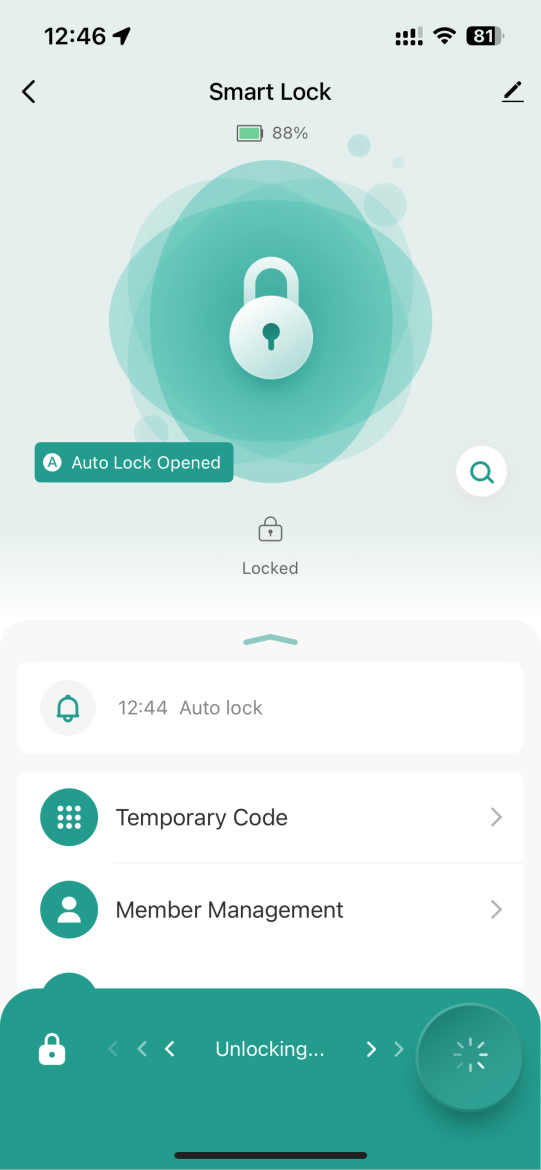
Unlocking process
The screen displays the ongoing process of unlocking the lock via the mobile application. The user has visual feedback that the unlock command has been received and is being executed.
- Status "Unlocking..." – informs about the active unlocking process
- Animation – provides visual confirmation of the course of action
- Security – the lock is only unlocked by authorized users
- Power – display battery level during the event
This feedback is important because it assures the user that the system is responding correctly to their command.

Automation and smart scenes
Automation is one of the most powerful features of a smart home. It allows devices to respond automatically based on specific inputs – such as motion, temperature changes, time, or manual instructions.
Its greatest advantage is the ability to connect multiple devices and create intelligent links between them. Thanks to automation, separate devices become a connected ecosystem that works logically and increases the overall comfort, security and efficiency of the home.
1. Manual start
The scene is triggered by manually pressing a button in the app or on the physical switch.
2. When the weather changes
Automation is triggered when external conditions change (e.g. temperature, humidity, wind).
3. Timetable
The scene will start at a specific time or according to a set recurring schedule.
4. When the device status changes *important
Automation is triggered in response to a change in another device – a motion sensor, door, camera, or other device.
📌 Automation parameters for this product can be found in the table below ↓
Automatizácie pre ANTIK Smart Bezpečnostnú schránku ATK-SHKLB2
Automatizácia umožňuje vytvárať prepojenia medzi udalosťami a akciami, ktoré schránka vykoná. Vďaka tomu si viete nastaviť pokročilé scenáre pre domácnosť, firmu či prenájom. Automatizácie možno nastaviť pomocou nasledujúcich parametrov:
| Parameter | Hodnota | Popis | Príklad v scéne |
|---|---|---|---|
| Zostávajúca batéria | 0-100 % | Zobrazuje percentuálny stav batérie schránky. | Keď batéria klesne pod 10 %, pošlem upozornenie na mobil. |
| Odomknúť odtlačkom prsta | Udalosť | Spustí scénu po úspešnom odomknutí odtlačkom prsta. | Keď odomknem schránku odtlačkom prsta, potom zapnem svetlo v predsieni. |
| Odomknúť kódom | Udalosť | Spustí scénu po úspešnom odomknutí pomocou kódu. | Keď zadám správny kód, odomknem schránku. |
| Odomknúť dynamickým kódom | Udalosť | Spustí scénu po úspešnom odomknutí jednorazovým alebo dočasným kódom. | Keď návšteva zadá dynamický kód, odomknem schránku. |
| Odomknúť kartou | Udalosť | Spustí scénu po úspešnom odomknutí priložením karty. | Keď odomknem schránku kartou, deaktivujem alarm. |
| Odomknúť mechanickým kľúčom | Udalosť | Spustí scénu po odomknutí štandardným mechanickým kľúčom. | Keď odomknem schránku kľúčom, systém zaznamená, že som prišiel domov. |
| Odomknutie cez Bluetooth | Udalosť | Spustí scénu po odomknutí pomocou Bluetooth. | Keď som blízko schránky, môžem ju odomknúť cez Bluetooth. |
| Upozornenia schránky | Nesprávny odtlačok prsta, Nesprávny kód, Nesprávna karta, Slabá batéria | Upozorňuje na rôzne chybové stavy. | Ak je zadaný nesprávny kód trikrát, pošlem upozornenie. |
| Zvonček | Zapnutý, Vypnutý | Aktivuje alebo deaktivuje funkciu zvončeka na schránke. | Keď stlačím tlačidlo zvončeka na schránke, pošlem notifikáciu na môj mobil. |
| Jazyk schránky | Rôzne jazyky | Nastavuje jazyk hlasových pokynov a displeja schránky. | Zmením jazyk schránky na angličtinu. |
| Hlasitosť schránky | Stlmená, Nízka, Normálna, Vysoká | Nastavuje hlasitosť zvukových upozornení a hlasových pokynov. | Počas noci nastavím hlasitosť na "Stlmená". |
| Automatické uzamknutie | Zapnuté, Vypnuté | Automaticky uzamkne po uplynutí nastaveného času. | Ak je schránka otvorená dlhšie ako 1 minútu, pošlem notifikáciu na mobil. |
| Stav otvorenia schránky | Otvorená, Zatvorená | Zobrazuje, či je schránka otvorená alebo zatvorená. | Ak je schránka otvorená dlhšie ako 5 minút, pošlem mi upozornenie. |
| Odomknúť dočasným kódom | Udalosť | Umožňuje odomknutie pomocou dočasného kódu. | Keď kuriér zadá dočasný kód, schránka sa odomkne na 5 minút. |
| Diaľkové odomknutie telefónom | Udalosť | Umožňuje odomknutie schránky na diaľku prostredníctvom aplikácie. | Keď som na dovolenke, môžem odomknúť schránku rodine cez aplikáciu. |
| Režim Nerušiť | Zapnutý, Vypnutý | Deaktivuje všetky zvukové upozornenia a funkcie na schránke. | Keď idem spať, zapnem Režim nerušiť. |

Frequently Asked Questions: ANTIK Smart Key Safe
What unlocking methods does it support?
PIN code (6–8 digits), unlocking via the ANTIK SmartHome application (locally via Bluetooth or remotely via gateway) and emergency mechanical key.
What is a virtual password (anti-peep)?
You can add any numbers before/after the correct code so that an observer cannot read the real PIN.
Does it have a built-in bell?
Yes. The Doorbell can be turned on/off in the app and used to notify you of arrival.
Is the box suitable for outdoor use?
Yes. With an IP66 rating and zinc alloy construction, it is suitable for both indoor and outdoor use, withstanding rain, dust and common weather conditions.
Is it possible to grant remote access?
Yes. Using the app and a connected gateway, you can generate temporary or one-time codes and manage access remotely.
Does the application record event history?
Yes, it stores a record of digital accesses (PIN, application) with date and time. Mechanical unlocking is generally not logged .
Do you have a question about a specific product, its features, technical parameters, or automation options in your home? We are here for you and will be happy to help you choose the right solution or explain the settings.
Write to us at predaj@antik.sk and our team of experts will respond to you as soon as possible. Your satisfaction and the proper functioning of your devices are our priority.
